
Introducing the Kajabi Course Importer: Seamless Course Migration Now in Zapiy
If you’ve been using Kajabi to host and sell your online courses, you know how valuable your content is. You also know how much effort it takes to build, organize, and deliver a smooth learning experience. That’s why we’re thrilled to unveil Zapiy’s Kajabi Course Importer, a powerful new feature designed to save you time, eliminate import failure and double work, and bring your educational products into our CRM with just a few clicks.
Whether you're transitioning your business, consolidating platforms, or simply exploring more scalable automation within Zapiy, this new tool empowers you to import Kajabi-hosted courses directly into your Zapiy account with ease. The process is designed to eliminate the usual headaches that come with migrating course content. No coding required. No manual uploading. No risk of losing lessons, files, or structure along the way. With just a few clicks, your course is transferred and ready to use inside Zapiy’s ecosystem. This update makes it easier than ever to streamline your workflow and maintain a smooth, uninterrupted learning experience for your audience.
Let’s dive into how it works, why it matters, and how you can start using it today.
What Is Zapiy's Kajabi Course Importer?
Zapiy’s Kajabi Course Importer is a newly launched feature under our Membership product tools. It is built specifically to transition from the manual process of importing your existing Kajabi courses into the Zapiy platform to a simplified one. Designed for course creators, coaches, and businesses that use Kajabi, this tool allows you to automatically import full courses into Zapiy’s learning system. These include video lessons, modules, and structured content.
With just a few easy steps, your Kajabi content is transferred and mirrored inside your Zapiy workspace, maintaining the original structure of your course without the need for tedious manual uploads or rebuilds. This not only saves hours of work but ensures that your lessons, organization, and media stay intact and ready for launch within your CRM.
But what truly sets Zapiy’s Kajabi Importer apart is its deep integration with your entire CRM environment. Once your course is imported, it becomes part of a fully connected ecosystem that is ready to be linked with client profiles, automated email sequences, lead tracking systems, appointment bookings, and sales workflows.
This turns your educational content into a fully operational digital asset—one that can help nurture leads, engage clients, generate revenue, and scale your brand. You’ll be able to track how learners interact with your content, trigger communications based on their progress, and create a seamless experience from signup to success.
Why This Feature Matters to Your Business
1. Effortless Course Migration
Forget the hassle of downloading videos, copying lesson text, and recreating course structures. With our Kajabi Importer, you can move entire course libraries with just a few clicks. Whether you're migrating one product or dozens, this tool handles it for you.
2. Automatic Content Replication
Your Kajabi videos and lessons are automatically transferred to Zapiy's native video hosting, ensuring no content is left behind. The structure of your course including sections, titles, and lesson orders, is preserved, minimizing the need for post-import cleanup.
3. Consolidated Platform Management
Instead of managing multiple platforms for CRM, email automation, and online courses, you can now unify your operations in Zapiy. This streamlines internal workflows, improves analytics, and reduces costs.
4. Enhanced Client Interactions
When your content is fully integrated into your CRM, you can personalize the learning experience for your clients. Trigger emails when someone finishes a course, offer upsells based on viewing behavior, or analyze customer engagement in one dashboard.
5. Scalable and Automated Growth
By bringing your Kajabi content into Zapiy, you're not just moving courses—you're preparing your business for automated scaling. Easily link your courses to sales funnels, appointment scheduling, payment processing, and affiliate tracking inside one ecosystem.
Use Cases for Kajabi Importer in Zapiy
Wondering if Zapiy’s Kajabi Course Importer is the right tool for you? Here are some real-world scenarios where this feature delivers significant impact:
Coaches and educators who are moving away from Kajabi can now skip the time-consuming process of re-uploading content. Instead of starting from scratch, they can quickly transfer years of course material into Zapiy with just a few clicks.
Marketing agencies working with multiple clients can consolidate course content, CRM tools, and client engagement features into one unified system. This streamlines operations and makes client management much more efficient.
Enterprise teams with training programs on Kajabi can use Zapiy's automation, user grouping, and reporting tools. These tools help grow team development.
Online entrepreneurs running memberships, coaching programs, or digital courses will appreciate how Zapiy centralizes their entire business. From course delivery and payment processing to lead nurturing and email automation, everything works together inside one platform.
How To Use the Kajabi Course Importer in Zapiy
Ready to get started? Follow these simple steps to import your Kajabi courses into Zapiy:
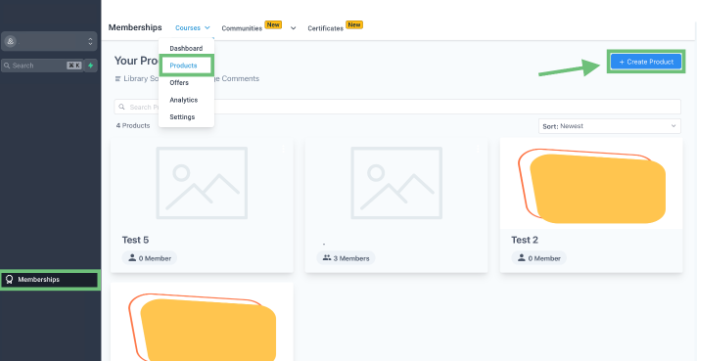
1. Navigate to the Membership Tab
From your Zapiy dashboard, click on the Membership tab in the left-hand navigation menu. Then select Products in the upper menu bar and click on the “+ Create Product” button.
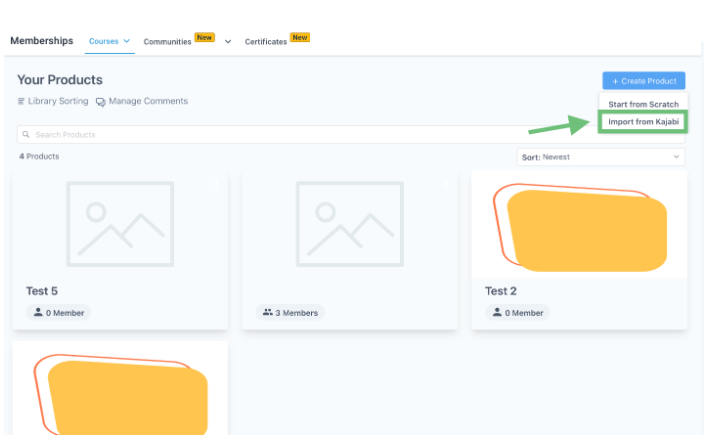
2. Choose the ‘Import from Kajabi’ Option
You’ll see a new option labeled "Import from Kajabi." Click on this to begin the transfer process.
3. Input Learner Credentials and Domain
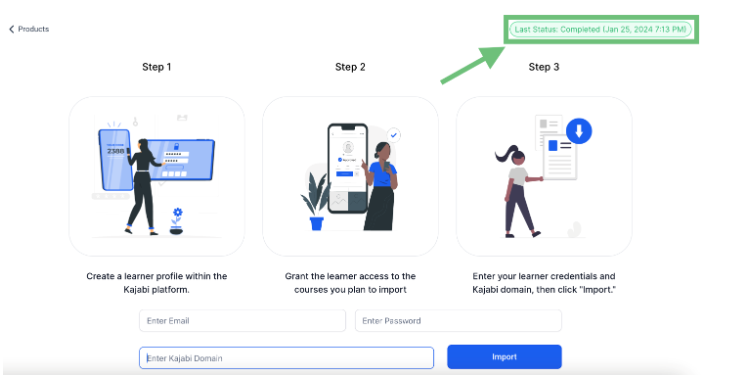
Create a learner profile in your Kajabi account (if one doesn’t exist already). Enter the email and password credentials of this learner into the provided fields. Also, input the domain of your Kajabi site (e.g., yourbusiness.mykajabi.com).
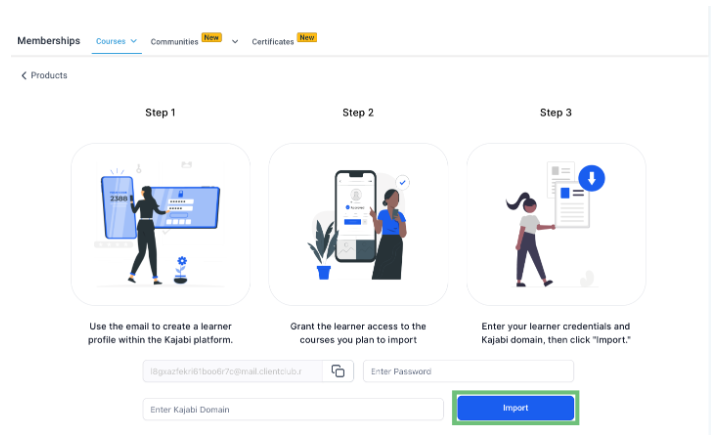
4. Initiate the Import Process
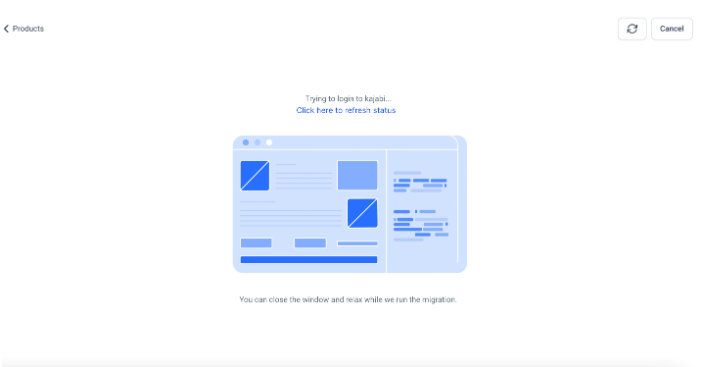
Click "Import" to start the process. Zapiy will automatically log in with the provided credentials and begin extracting your courses.
5. Monitor the Import Progress
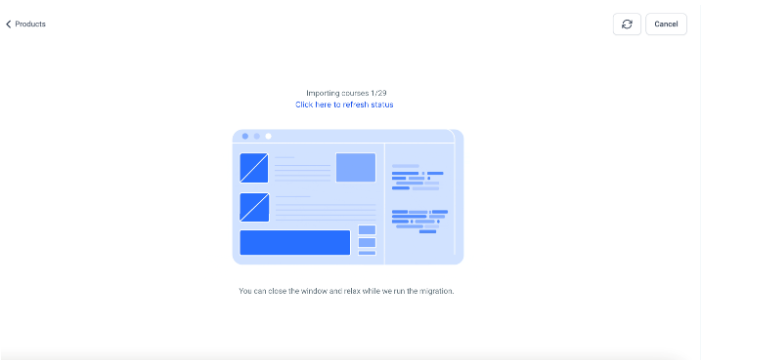
Once the import starts, you’ll see a progress bar showing how much content has been migrated. Use the Refresh button to check the real-time status.
6. Access Your Imported Courses
After successful import, the courses will appear under your Products section. You’ll also see a status update under the Import tab, showing when the last migration occurred.
Pro Tips for a Smooth Kajabi Import
To ensure a seamless transition, keep these tips in mind:
✅ Double-check access permissions: Make sure the learner account used has access to all courses you wish to import.
✅ Organize your Kajabi dashboard: Simplify folder names and lesson titles beforehand to maintain clarity post-migration.
✅ Preview before publishing: Review each imported course in Zapiy to ensure lessons, videos, and descriptions appear correctly.
✅ Add automation: Link imported courses with automated email sequences or appointment booking to enhance engagement.
How to Choose the Best Kajabi Course for Your Goals
With thousands of creators using Kajabi to host online courses, choosing the right one can feel overwhelming. Whether you’re looking to boost your career, start a new business, or learn a personal skill, here’s how to choose the best Kajabi course that fits your goals, learning style, and budget.
1. Clarify Your Objective
Before browsing, be clear on what you want to achieve. Are you looking to gain a specific certification, learn a new tool, or improve soft skills? The best course aligns directly with your short-term and long-term goals. Filter out anything that doesn’t contribute to your growth plan.
2. Check the Instructor’s Credibility
Kajabi empowers real experts to become course creators. Look at the instructor’s background—do they have industry experience? Are they actively using the skills they teach? Courses by seasoned professionals with real-world application tend to offer more than just textbook theory.
3. Look at Course Structure and Format
Is the course broken into modules with clear outcomes? Does it include video, templates, quizzes, or community access? The best Kajabi courses have a logical flow and diverse formats that cater to different learning preferences. Bonus points if it’s mobile-friendly or self-paced.
4. Read Reviews and Testimonials
Student reviews offer honest insights into how valuable and practical the course is. Look beyond star ratings and read what people actually say. Are they seeing real results? Did the course exceed expectations? A great course will have a track record of student success.
5. Evaluate the Price and ROI
Not all expensive courses are better, and not all cheap ones are lacking. Consider what’s included: Are there lifetime access, bonuses, coaching calls, or downloadable resources? Think of the return on investment: Will this course help you earn, grow, or save time?
Pro Tip: Once you’ve chosen a Kajabi course and completed it, you can now import it directly into Zapiy using our Kajabi Course Importer to centralize your learning materials and client offerings. This is perfect if you’re also building your own course or using it as part of your coaching business.
Final Thoughts
The Kajabi Course Importer is a tool that helps you move your educational content smoothly into a fully connected CRM system. Zapiy removes the need for manual uploads and using many platforms. This lets you focus on giving value, engaging your audience, and growing your business.
If you are a coach, entrepreneur, agency, or enterprise team, this feature lets you combine your content, automate workflows, and manage the customer journey in one place. It’s the next step toward building a smarter, more scalable operation with fewer moving parts and more powerful outcomes.
Ready to take the next steps? Visit your CRM dashboard now.


Youtube
Facebook
Instagram
LinkedIn
TikTok
X
Pinterest