
Enhancing Customer Interactions: Reordering Appointment Questions Using Conversational AI
When it comes to customer engagement, the efficiency of appointment scheduling plays a critical role in shaping the user experience. Businesses are increasingly turning to Conversational AI to streamline communication and optimize workflows. Zapiy's recent update now enables users to re-order appointment-related questions within the AI flow, allowing for greater customization and precision in client interactions.
This enhancement transforms how businesses approach appointment booking conversations and turns static scripts into dynamic, user-first experiences. By simply reordering questions based on relevance, context, or user behavior, businesses can build smarter flows that result in higher satisfaction and conversion rates.
This update may seem simple, but it creates a noticeable difference in how customers move through the process. It gives teams the flexibility to design conversations that feel natural and logical, instead of forcing users through a fixed sequence. With more control over the order of questions, businesses can reduce friction, improve clarity, and guide customers more effectively from start to finish.
By improving the flow of appointment-related questions, Zapiy helps businesses create conversation paths that are more aligned with real customer needs. The result is a smoother experience, better engagement, and stronger outcomes across every interaction.
Enhancing Customer Interactions: Reordering Appointment Questions Using Conversational AI
Understanding the Role of Conversational AI in Appointment Scheduling
Why Reordering Appointment Questions Matters
How to Customize Appointment Question Flow: Step-by-Step
Step 1: Navigate to Your Settings
Step 2: Access the Conversation AI Module
Step 3: Open the Appointment Booking Flow
Step 4: Add or Modify Questions
Step 5: Reorder Questions for Logic and Clarity
Optimizing Your Appointment Flow Over Time
Beyond Rearrangement: Conditional Logic and Smart Routing
Understanding the Role of Conversational AI in Appointment Scheduling
Conversational AI refers to technologies that simulate human-like conversations, typically through chatbots or voice assistants. In appointment booking, Conversational AI enables automation of the interaction process like collecting information, offering available slots, and confirming bookings, all without human intervention.
Until recently, many platforms offered rigid scripts for these interactions. This rigidity often led to generic conversations that failed to adjust to a user’s intent or urgency. For example, a potential client might be asked for their preferred appointment date before their concern or service type, creating confusion or unnecessary back-and-forth.
With the ability to reorder questions, companies can now adapt conversation flows to suit various scenarios, increasing relevance and reducing friction. This is especially important for industries like healthcare, finance, and service-based businesses, where appointments are critical to business operations.
Why Reordering Appointment Questions Matters
Allowing dynamic reordering of questions in appointment booking flows has measurable benefits across business performance and user experience. Let’s break down why this matters:
1. Personalization at Scale
Every user has a different intent when interacting with a chatbot or virual assistant. Some are ready to book immediately; others need clarification before proceeding. By enabling businesses to reorder questions based on priority or customer profile, this feature introduces flexibility into what was previously a rigid process.
For example: A dental practice might want to ask, “What kind of dental service are you looking for?” before asking for a preferred date or time, ensuring availability matches the service needed.
2. Improved Flow Efficiency
Misplaced or unnecessary questions can create bottlenecks. By adjusting the order of questions, businesses can surface only the most relevant prompts first. This reduces drop-off rates and ensures users reach the booking confirmation stage faster.
3. Better Data Collection
Organizing questions in a more logical sequence helps ensure better accuracy and completeness of the information collected. This reduces the need for follow-up and minimizes errors, especially when dealing with complex appointment types or multi-provider scheduling.
4. Real-Time Adaptation
Businesses that monitor user behavior can continuously refine the order of their conversational flows based on performance data. For instance, if analytics show that users abandon the conversation after being asked a pricing-related question too early, that question can be moved further down the flow or shown conditionally.
How to Customize Appointment Question Flow: Step-by-Step
Configuring the question order within your Conversational AI tool can typically be done from the system’s admin panel. While specific UI labels may vary depending on your platform, the general process remains consistent. Here’s a step-by-step guide to help you optimize your flow:
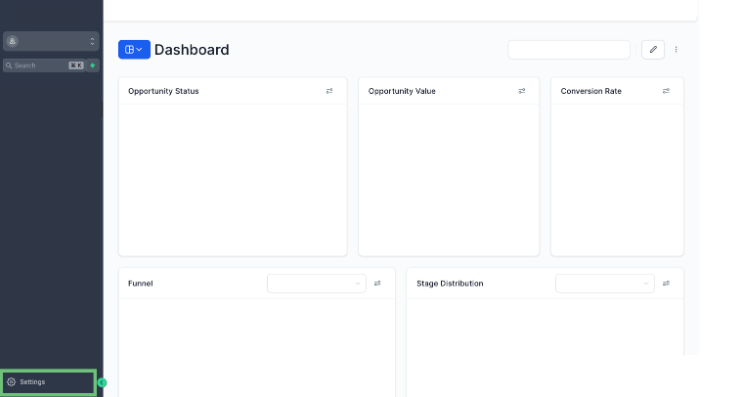
Step 1: Navigate to Your Settings
Start by logging into your account and heading to the system settings area. Look for the section that governs chatbot or artificial intelligence conversation configurations.
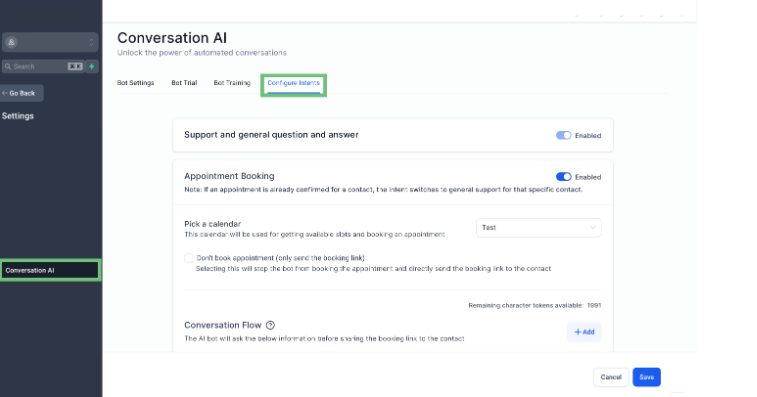
Step 2: Access the Conversation AI Module
Within the main menu or side navigation, locate the “Conversation AI” tab. Select it to view available conversational modules and automation settings.
Once inside, go to the upper navigation bar and find the “Intents” or “Configure Intents” option. This is where all user-defined interaction paths are stored and managed.
Step 3: Open the Appointment Booking Flow
Look for the flow associated with appointment scheduling. This may be labeled something like “Appointment Intent” or “Booking Flow.”
Once selected, you’ll see a list or flowchart of questions currently used in the booking process.
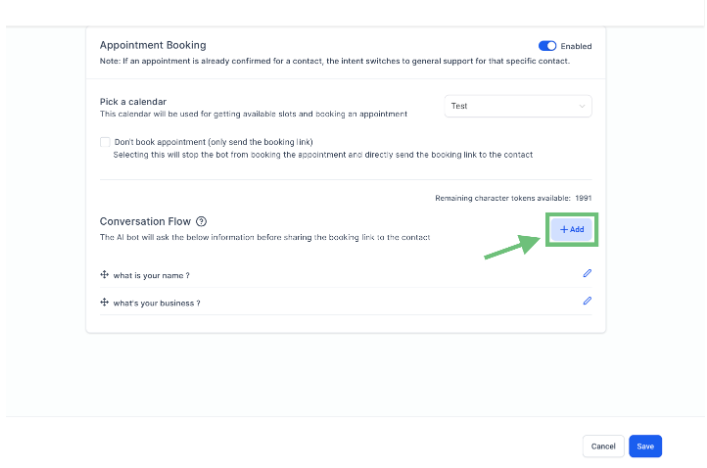
Step 4: Add or Modify Questions
If you need to include a new question (e.g., “Is this your first visit?”), use the “Add” or “+” button to input your question and select the appropriate response format (e.g., text, dropdown, yes/no).
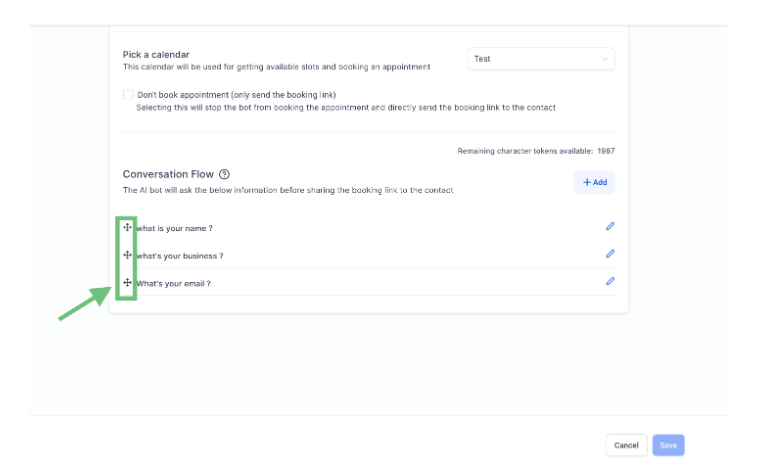
Step 5: Reorder Questions for Logic and Clarity
To change the order of questions, simply drag and drop them into your desired sequence. Some systems may use a reorder icon or arrow controls for this task.
Be sure to reorder questions in a way that mimics a real-life conversation. For instance, ask for service type or concern first, followed by availability, and then follow-up information like email or phone.
Step 6: Test Your Flow
Before activating changes, test the conversation flow using a preview or sandbox environment. Simulate different user intents to confirm the flow feels natural and complete.
Use Cases Across Industries
The ability to reorder appointment questions in a conversational AI flow creates targeted, efficient experiences across a variety of industries. Here’s how different sectors can benefit:
Healthcare
Clinics and hospitals can prioritize questions about symptoms or insurance coverage before offering appointment slots. This helps route patients to the right specialists and ensures key information is captured early.
Education
Schools and universities can ask about a student's course interest or program focus before presenting available times with advisors. This streamlines academic counseling and connects students to the appropriate departments.
Legal Services
Law firms can begin with questions about the nature of a legal issue, such as criminal, family, or business law, before showing availability. This ensures clients are matched with the most suitable lawyer from the outset.
Real Estate
Agencies can ask clients whether they’re looking to buy, rent, or sell before offering appointment options. This reduces back-and-forth and allows agents to prepare for more productive meetings.
By tailoring the sequence of questions to each industry’s specific workflow, businesses can enhance efficiency, improve lead qualification, and deliver a more personalized customer experience from the very first interaction.
Optimizing Your Appointment Flow Over Time
The real advantage of dynamic question ordering lies in continuous improvement. Businesses should track:
Drop-off points: Where users stop interacting
Conversion rates: How many users complete bookings
Time to completion: How long users spend on booking
From this data, you can iteratively update the question flow to better match user behavior and intent. For example:
If users often abandon the conversation when asked for contact details first, consider moving that question toward the end.
If a specific service or offering requires pre-qualification, position that question early to segment leads more efficiently.
Beyond Rearrangement: Conditional Logic and Smart Routing
While reordering questions offers a better linear experience, combining it with conditional logic takes customization further. Conditional logic allows the conversation to branch based on user input.
For example:
If a user selects “emergency repair” as their concern, the next question could bypass regular booking slots and offer direct hotline access.
For returning clients, the system could skip introductory questions entirely.
Over time, integrating reorder capabilities with intelligent routing can produce high-performing artificial intelligence conversations that feel both human and responsive.
What Makes This Update Technically Significant?
This update goes beyond user experience. It offers technical teams new tools for:
Rapid prototyping of conversational flows
In-line optimization without needing development cycles
Integration with CRM logic, such as segment tagging based on responses
It reflects the move toward modular conversation design and treats chatbot interactions not as static scripts but as living processes that evolve based on data and business needs.
Conclusion
In conclusion, modern appointment scheduling should be intuitive, efficient, and aligned with user intent. The ability to reorder questions within Conversational AI flows is a subtle yet powerful upgrade that allows businesses to fine-tune every interaction. By adapting the order of questions to better suit the user's journey, teams can deliver smoother, more relevant experiences without needing to overha
This level of customization improves more than just convenience. It also strengthens lead qualification, shortens decision cycles, and boosts customer satisfaction. Whether you’re qualifying prospects in a sales funnel or gathering client preferences before a consultation, optimizing the flow ensures that each conversation drives value.
As digital expectations continue to rise, refining these micro-interactions will make the difference between a missed opportunity and a confirmed booking. It's not just about asking the right questions but also asking them at the right time, in the right order.
With Zapiy, implementing these enhancements becomes simple and scalable. From configuring flows to measuring impact, Zapiy equips your team with the tools needed to build smarter appointment journeys. Ready to adopt this update today? Visit your CRM now and turn routine scheduling into a personalized, high-converting customer touchpoint.


Youtube
Facebook
Instagram
LinkedIn
TikTok
X
Pinterest